
Bsb007 Login
The Bsb007 login starts from the white LOGIN button in the account panel at the top right of the homepage. The form asks for a mobile number or username and a password of 6-20 characters. Mobile numbers use the international format without a plus sign or leading zero, as in the form's example 61480050689.
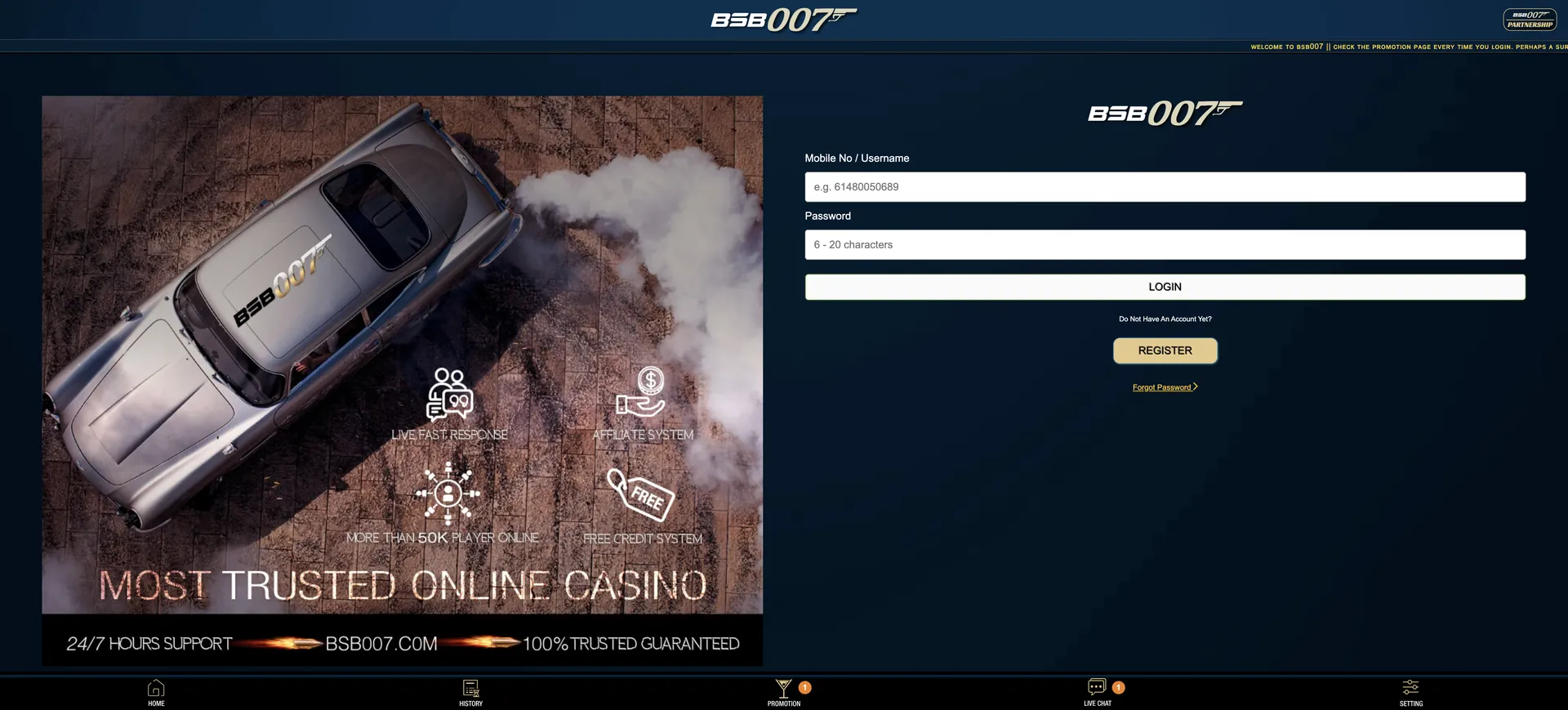
The same form works on desktop and in mobile browsers. If sign-in fails, the Forgot Password link below the Register button resets access, and the 24/7 live chat handles locked or blocked accounts.
The login page has three elements on the right: the two fields, the LOGIN button and a gold REGISTER button for visitors without an account. Banners on the left promote live support, the free credit system and the affiliate system. The site does not mention a two-factor step, so the password is the main barrier protecting a Bsb007 account. The rest of this guide covers secure habits, recovery steps and fixes for the errors Australian players run into most often.

| Login essentials | Details |
|---|---|
| Where to log in | White LOGIN button in the top-right account panel |
| Login ID | Mobile number (format 61XXXXXXXXX) or username |
| Password | 6-20 characters |
| Two-factor authentication | Not mentioned on the site |
| Password reset | Forgot Password link under the REGISTER button |
| Devices | Desktop and mobile browsers, same form |
| Account name rule | Username must be the full name matching the bank account |
| Currency after login | AUD |
| Support | 24/7 live chat from the bottom bar |
How to complete the Bsb007 login
Signing in takes two fields and one click. The main thing to get right is the format of the login ID, because a mobile number typed the Australian domestic way (starting with 04) does not match the format the form expects.
Step-by-step login
The steps are identical in Chrome, Safari, Firefox and Edge, on both computers and phones.
- Open bsb007aus.org. If the domain does not load, use the Backup Domain link listed in the footer.
- Click the white LOGIN button in the account panel at the top right.
- In Mobile No / Username, enter either the registered username or the mobile number as 61 followed by the number without its leading 0 (for example, 0480 050 689 becomes 61480050689).
- Type the password. It is 6-20 characters long and case-sensitive.
- Press LOGIN. The lobby reloads with the balance shown in AUD in the account panel.
- Press Refresh in the account panel if a recent deposit is not yet reflected in the balance.
No account yet: create one first
Visitors without a profile see "Do Not Have An Account Yet?" under the login button, followed by the gold REGISTER button. Registering takes a few minutes. The username chosen at this stage stays important for the life of the account, because it is checked against the bank account name when withdrawing.
Quick registration flow
These points keep the new account ready both for login and for future withdrawals:
- Click REGISTER on the login page or in the homepage account panel.
- Enter an Australian mobile number in 61 format. It doubles as a login ID.
- Set the username to the full name exactly as it appears on the bank account.
- Choose a 6-20 character password that is not used on any other site.
- Submit the form, then log in and open the Promotion tab, where the AUD 18 Register Bonus is waiting.
Details on the free credit are on the Bsb007 no deposit bonus page.
Secure login practices
With no two-factor step mentioned, account safety depends on the password and on opening the site only from trusted links. These habits close the most common gaps:
- Use a long password (the form accepts up to 20 characters) and do not reuse it on email or social media.
- Save the main domain and the footer's backup domain as bookmarks rather than searching for the site each time. Search results for the brand include many unrelated pages.
- Never share the password with anyone claiming to be support. The live chat does not need it to help.
- Log out on shared computers and avoid saving the password in a browser that other people use.
- Check the History tab after each session for any deposit, withdrawal or bonus entry that was not made by the account holder.
Password recovery
The Forgot Password link sits directly under the REGISTER button on the login page. It is the first route for a forgotten password. If the reset cannot be completed, for example because the registered mobile number is no longer in use, the live chat can verify the account holder and restore access.
Reset steps
Recovery normally takes a few minutes when the registered mobile number is at hand.
- Open the login page and click Forgot Password.
- Enter the mobile number or username linked to the account.
- Follow the instructions sent to the registered contact details.
- Choose a new password of 6-20 characters that differs from the old one.
- Log in with the new password and confirm the balance and History look correct.
- If no reset message arrives, open the live chat and give the username and registered mobile number.
Bsb007 Casino login on mobile
On phones the login form is the same as on desktop, and the bottom navigation bar (Home, History, Promotion, Live Chat, Setting) stays fixed at the bottom of the page. No app download is needed, and adding the site to the home screen makes the login one tap away. Instructions for iOS and Android are on the Bsb007 app page.
Tips for mobile
Most mobile login problems come from the keyboard or the browser rather than the account itself.
- Check that auto-capitalisation has not changed the first letter of the password.
- Turn off autocorrect suggestions that may add a space after the mobile number.
- If the page loads without styling or the button does not respond, switch between Wi-Fi and mobile data and reload.
- Use the browser's password manager on a personal phone to avoid typing errors.
Troubleshooting common login errors
When a Bsb007 Casino login attempt fails, the cause usually falls into one of four groups. Working through them in order solves most cases without waiting for support.
Incorrect credentials
The usual cause is the mobile number format. The form expects 61 followed by the number without its leading zero, so "0480050689" or "+61 480 050 689" may not be recognised. Using the username instead of the number avoids the formatting issue. Passwords are case-sensitive, so Caps Lock is the second thing to check.
Browser or cache issues
If the page loads but the LOGIN button does nothing, or the session drops right after sign-in, stored browser data is often the cause.
- Clear the cache and cookies for the site and reload.
- Disable script-blocking or ad-blocking extensions for the domain.
- Try another current browser such as Chrome, Safari, Firefox or Edge.
Site does not load
If the domain does not open at all, the issue is reaching the site rather than the account. The footer lists a Backup Domain, and accounts and balances are the same on every official Bsb007 domain. Links to the site from unofficial sources should be avoided.
Account blocked or suspended
A blocked account cannot be fixed through the login form. Common reasons in this segment include duplicate accounts, a username that does not match the bank account name and unusual bonus activity. The live chat is the only route to find out the reason and what is needed to restore access. Its attachment button lets players send documents straight away.
What you access after the Bsb007 login
Once signed in, the account panel shows the AUD balance and the full site is available:
- Lobby: 28 pokies providers plus the card games and other category tiles (see the Bsb007 pokies guide).
- Promotion: every bonus card with its OPEN button, including the 50% Welcome Bonus and AUD 18 Register Bonus.
- History: a record of deposits, withdrawals and bonus activity.
- Deposit and Withdrawal: the AUD cashier, with a minimum deposit of AUD 50 and a minimum withdrawal of AUD 100.
- Live Chat: 24/7 support with file attachments.
- Setting: account preferences.
- Referral tools: Share, Downline and Copy Referrer Link for the weekly 7% commission.
Account verification and the name rule
The site does not publish a document checklist. The rule stated in the live chat greeting is the core of verification at Bsb007: the username must be the full name, and the bank account name must match it. That match is checked when a withdrawal is requested. Support may ask for identity documents or a bank statement through the chat's attachment button, especially before a first or large payout. Correcting a mismatched username before winning anything is much faster than sorting it out with a withdrawal pending. The full payout process is on the Bsb007 withdrawal page.
Updated on 2 November 2026.
Bsb007 Login FAQ
Short answers to the sign-in questions Australian players ask most often.
Where is the Bsb007 login button?
It is the white LOGIN button in the account panel at the top right of the homepage, next to the gold REGISTER button.
Can I log in with my mobile number?
Yes. Enter it in the format 61 followed by the number without the leading zero, as in 61480050689. The username works as well.
How long can the Bsb007 password be?
Between 6 and 20 characters. It is case-sensitive.
What if I forget my password?
Use the Forgot Password link under the REGISTER button. If the reset does not arrive, the 24/7 live chat can restore access after confirming the account holder.
Does Bsb007 use two-factor authentication?
The site does not mention a two-factor step. A unique, long password is the main protection.
Why does the site not open?
The main domain may be temporarily unavailable. The footer lists a Backup Domain, and the same login details work on it.
Is the Bsb007 login the same on desktop and mobile?
Yes. The same form and the same credentials work in any desktop or mobile browser across Australia.