
Bsb007 App
There is no Bsb007 app download on the official site: the menus, footer and account panel contain no App Store, Google Play or APK link. Bsb007 instead runs as a browser platform designed for phones, with an app-style bottom navigation bar (Home, History, Promotion, Live Chat, Setting).
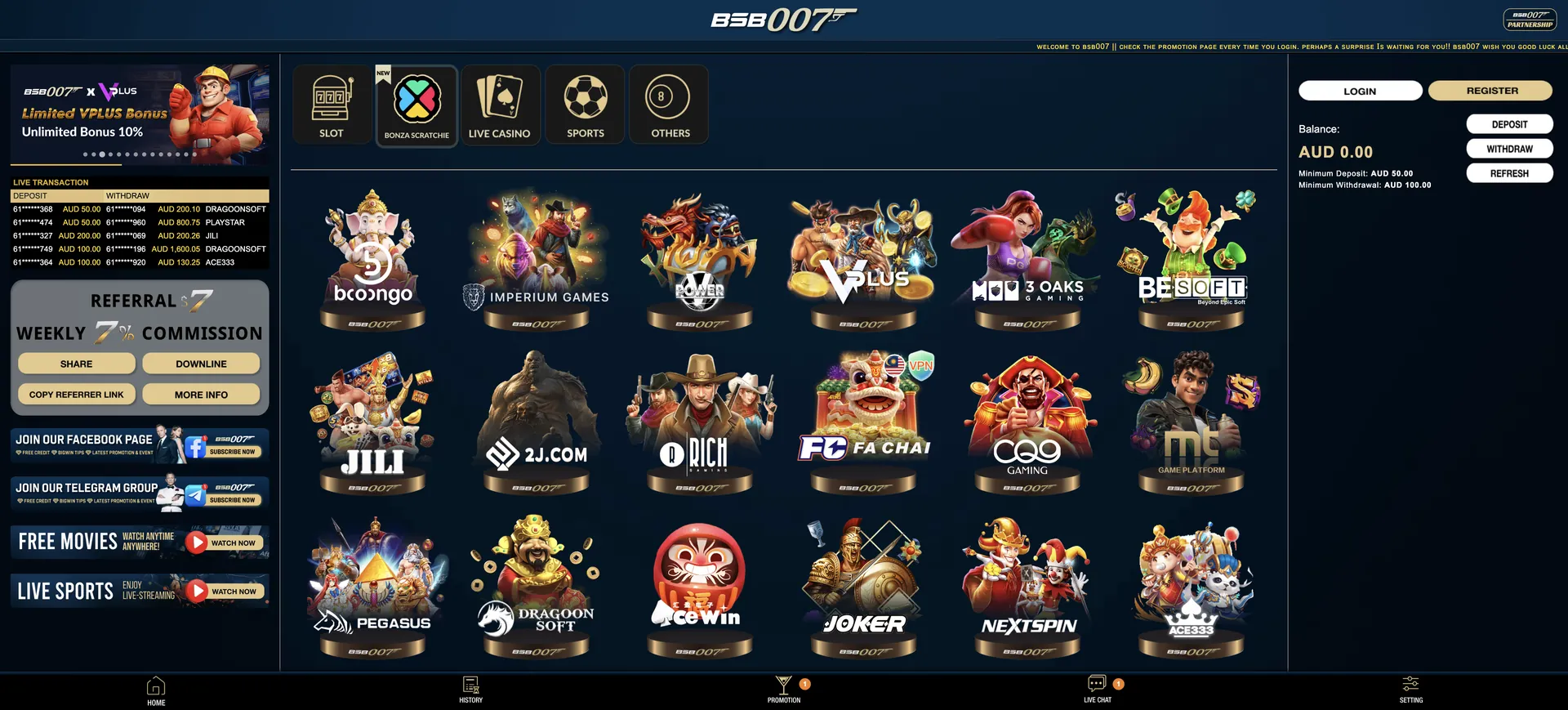
The full pokies lobby, the AUD cashier and every promotion are available in Safari or Chrome. A home screen shortcut on iPhone or Android opens the site in one tap, much like an installed app, without taking up storage or needing updates.
This guide explains how to open Bsb007 on a phone, how to create the shortcut on iOS and Android, what works on mobile, how deposits and withdrawals in AUD are handled on a small display, and why app files offered on third-party sites are best avoided by Australian players.
| Feature | Mobile browser details |
|---|---|
| Download required | No. The site runs in the browser |
| App download link on the site | None in the menus or footer |
| iOS access | Safari, Chrome or another current browser |
| Android access | Chrome, Firefox, Samsung Internet or another current browser |
| Home screen shortcut | Available on iOS and Android through the browser menu |
| Navigation | Fixed bottom bar: Home, History, Promotion, Live Chat, Setting |
| Game lobby | Same 28 pokies providers as on desktop |
| Cashier | AUD deposits from AUD 50, withdrawals from AUD 100 |
| Promotions | All bonus cards, including the AUD 18 Register Bonus |
| Support | 24/7 live chat with file attachments |
| Updates | Automatic, since the site is always the current version |
Is there a Bsb007 Casino app for Android or iOS?
No. Bsb007 does not link a native app from its site. Online casino apps of this kind are not available on the Apple App Store or Google Play for Australian accounts, because both stores restrict real-money casino apps to operators licensed in the user's country. Bsb007 instead built its site to work like an app. The fixed bottom bar, large tap targets and grid of provider tiles behave the way a casino app would, so the lack of a download has little effect on everyday use.
One practical benefit is that the browser version is always up to date. New promotion cards, provider tiles and cashier changes appear the moment they go live, without app store reviews or manual updates.
How to access Bsb007 on mobile
Opening Bsb007 on a phone works the same way on any current device:
- Open Safari, Chrome or another browser on the phone.
- Type bsb007aus.org in the address bar. If it does not load, use the Backup Domain listed in the site footer.
- Tap the white LOGIN button, or the gold REGISTER button to create an account.
- Enter the mobile number in 61 format (for example 61480050689) or the username, then the password.
- Use the bottom bar to move between the lobby, History, Promotion, Live Chat and Setting.
How to add Bsb007 to your home screen
A home screen shortcut is the closest thing to a Bsb007 app. It puts an icon next to the phone's other apps and opens the site directly, skipping the address bar and avoiding typing errors in the domain. The steps differ slightly between iOS and Android.
iOS instructions (Safari)
On iPhone and iPad the shortcut is created from Safari's share menu.
- Open bsb007aus.org in Safari.
- Tap the Share icon (a square with an upward arrow).
- Scroll down and tap Add to Home Screen.
- Keep the name "Bsb007" or enter a different label, then tap Add.
- The icon appears on the home screen and opens the site directly.
Android instructions (Chrome)
On Android phones the option sits in Chrome's three-dot menu.
- Open bsb007aus.org in Chrome.
- Tap the three-dot menu at the top right.
- Choose Add to Home screen.
- Confirm the name and tap Add.
- Drag the icon to the preferred spot on the home screen.
Features available on Bsb007 mobile
The mobile site carries the same features as the desktop version, organised around the bottom bar:
- Pokies lobby: all 28 provider tiles, including Booongo, JILI, Microgaming, CQ9 Gaming, NextSpin and VPlus. The full list is in the Bsb007 pokies guide.
- Promotions: every card with its OPEN button, from the 50% Welcome Bonus to the six VIP tiers.
- History: deposits, withdrawals and bonus records.
- Cashier: AUD deposits and withdrawals from the Deposit and Withdrawal links.
- Live Chat: 24/7 support with a paperclip button for photos of documents.
- Referral tools: Share, Downline and Copy Referrer Link for the weekly 7% commission.
- Community links: the Bsb007 Facebook page and Telegram group.
Performance on mobile
Because Bsb007 is a browser platform, speed depends mostly on the phone, the browser and the connection rather than on an app build.
- Lobby: provider tiles are graphics-heavy, so the first load on mobile data takes a moment longer than later visits, when the browser has cached them.
- Pokies: each provider's games open in HTML5 inside the browser, with no plugins required.
- Promotions: the card grid wraps to the width of the phone, and the OPEN button shows the full conditions in place.
- Live chat: the message field and attachment button stay above the bottom bar, which makes sending documents from the phone's photo library quick.
Mobile payments and withdrawals in AUD
The cashier on mobile follows the same rules as on desktop. The minimums are printed in the account panel, and every transaction appears in the History tab. The public pages do not list payment methods, which appear in the cashier after login.
| Parameter | Value |
|---|---|
| Minimum deposit | AUD 50 |
| Minimum withdrawal | AUD 100 |
| Currency | AUD |
| Name rule | Bank account name must match the username (full name) |
| Balance update | Refresh button in the account panel |
| Transaction record | History tab in the bottom bar |
Withdrawal steps and the most common reasons for delays are covered on the Bsb007 withdrawal page.
Security of the mobile version
The safest way to open Bsb007 on a phone is through the browser, from the main domain or the footer's backup domain. Search results for "Bsb007 app" include many third-party pages offering APK files. Installing an APK from an unknown source can expose the phone to malware or to a fake login page that captures credentials, so it is best avoided. A home screen shortcut created from the real domain gives the same convenience without that risk.
The account itself is protected by a 6-20 character password. The site does not mention two-factor authentication, so on a phone it makes sense to keep the screen lock on, use a unique password and log out on shared devices.
Usage tips for Australian players
A few habits make Bsb007 on mobile smoother:
- Create the home screen shortcut from the official domain once, then always open the site from that icon.
- Use Wi-Fi for long sessions, because graphics-heavy lobbies use more mobile data.
- Press Refresh in the account panel after a deposit instead of reloading the whole page.
- Keep photos of an ID and a recent bank statement ready, in case live chat asks for them before a withdrawal.
- Set a deposit budget before playing. Gambling Help Online (1800 858 858) offers free 24/7 support across Australia.
Updated on 2 November 2026.
Bsb007 App FAQ
Quick answers about using Bsb007 on phones and tablets.
Is there an official Bsb007 app?
No download is linked from the official site. Bsb007 runs in mobile browsers with an app-style layout.
Can I download a Bsb007 APK?
The site offers no APK. Files with that name on other websites are not linked from Bsb007 and may be unsafe.
How do I put Bsb007 on my home screen?
On iPhone, use Safari's Share menu and choose Add to Home Screen. On Android, use Chrome's three-dot menu and choose Add to Home screen.
Are all pokies available on mobile?
Yes. The mobile lobby shows the same 28 providers as the desktop version.
Can I claim the AUD 18 Register Bonus on my phone?
Yes. Open the Promotion tab in the bottom bar and press OPEN on the Register Bonus card. The Bsb007 bonus page lists every other offer.
Can I withdraw from my phone?
Yes. The Withdrawal link works on mobile, with the same AUD 100 minimum and full-name rule as on desktop.